Help
spread the word! Help
spread the word!
Click this link to post a message about
Farm Report
on your Facebook wall. Tell your farmer friends what you like about it!
|
|
|
What does it look like?
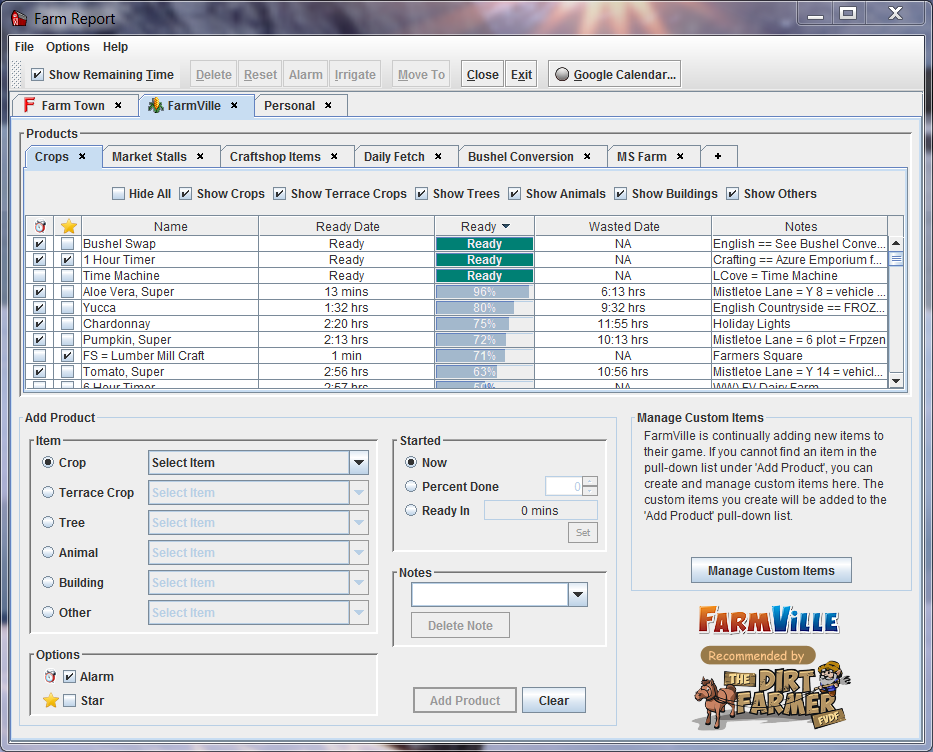
| This table shows your products:
|
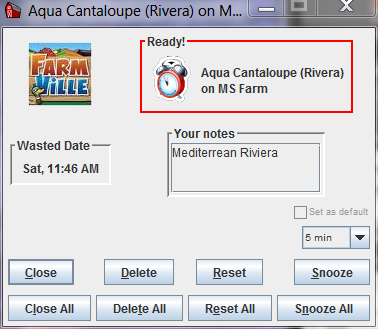
This alarm will appear on your desktop
when your products are ready:
|
|
Is it safe?
There have recently been some security issues
surrounding Java, and you might be wondering if
Farm Report is safe
to use. It is.
The Java programming language is used for two
distinct types of programs: Java applets
and Java desktop applications.
Java applets are little programs
that appear on some websites. These little
programs may run when you visit these websites.
Some of these programs can allow others to access
your computer. Security experts recommend that
you block these programs by disabling Java in your
browser (click
here for instructions).
Java desktop applications are
programs that run directly on your computer (not
within a browser). These Java programs are not
subject to the security concerns of the Java
applets.
Farm Report is a
desktop application, and is safe to
use.
|
Will it run on my computer?
 Farm Report is a
Java desktop application. In order to run it, you must have
Java installed on your computer. However,
it is not necessary that you have Java enabled in
your browser. Farm Report is a
Java desktop application. In order to run it, you must have
Java installed on your computer. However,
it is not necessary that you have Java enabled in
your browser.
If Java is not already installed on your system,
click
here to download it.
Farm Report has been tested on
Windows 2000, Windows XP, Windows Vista, Windows 7
& 8 (32 bit & 64
bit), Linux, and Mac OS X (10.5 or later).
|





 Download Farm Report